
Free FAI F9A referee system
Free Online Drone Soccer Scoreboard
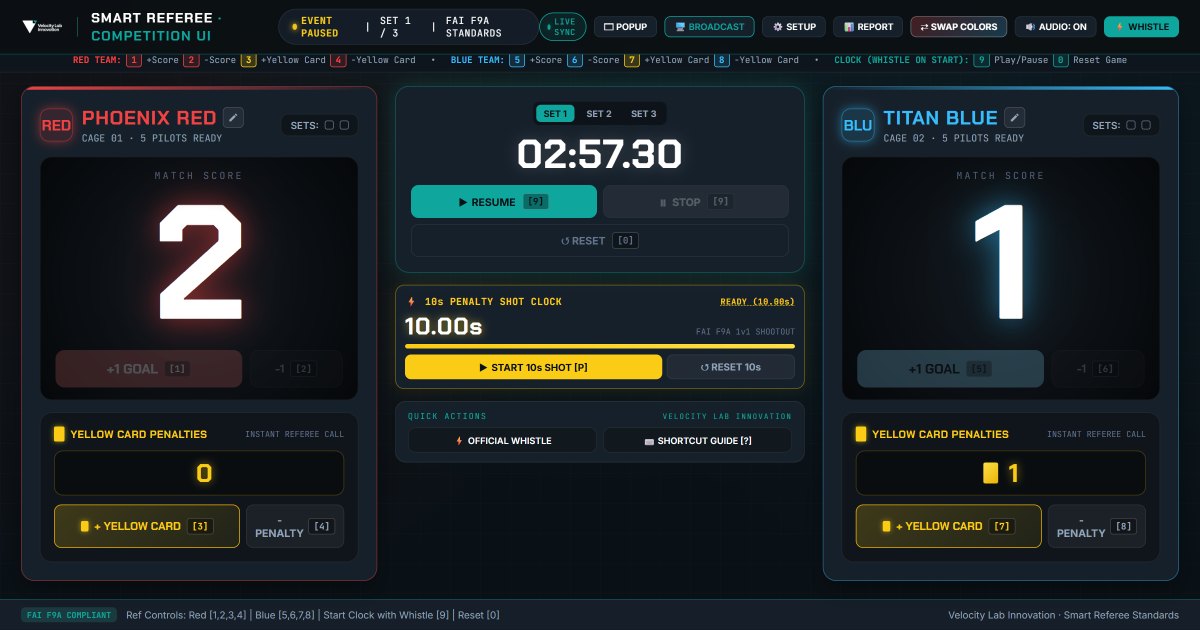
A free online drone soccer scoreboard and referee system for FAI F9A matches: match timer, scores, yellow cards, a 10-second penalty shot clock, whistle and 5-second countdown audio, plus a spectator display for projectors or OBS. No sign-up, nothing to install.
- 3-set match clock
- Scores and yellow cards
- 10-second penalty shot clock
- 5-second countdown audio
- Spectator and OBS broadcast view
- CSV / JSON export and printable match report
The console is built for a laptop or a tablet in landscape. On a phone, tap “Open full screen” and turn your device sideways.
A scoreboard and referee timer built for drone soccer
The VLI drone soccer scoreboard puts everything a referee needs on one screen: a three-set match timer, both team scores, yellow cards, set wins and the 10-second penalty shot clock. It is set up for FAI F9A drone soccer rules out of the box, and set and shot times can be changed for youth, practice or local events.
From school lessons and club training to open tournaments, all you need is a laptop: open the page, enter the team names and blow the whistle, while spectators follow the same live score on a projector or stream.
- Schools and STEM drone soccer programmes
- Drone soccer clubs and practice sessions
- Local and open FAI F9A tournaments
- Live streams and OBS broadcasts
Run a match in three steps
01
Set up the match
Press SETUP (or S) to enter team names and choose the set length and penalty shot time.
02
Referee the match
Press 9 to blow the whistle and start the clock, record goals and cards with the number keys, and press P for a 10-second penalty shot.
03
Show and record
Press POPUP to put the spectator view on a second screen or into OBS. After the match, press REPORT to export or print a match sheet ready for signatures.
Keyboard shortcuts
Number keys follow the team colour, not the side of the screen — swap colours and the keys move with the team. Works with USB keypads and foot pedals.
- 12
- Red team goal / undo goal
- 34
- Red team yellow card / remove card
- 56
- Blue team goal / undo goal
- 78
- Blue team yellow card / remove card
- 9
- Start or pause the match clock (with whistle)
- 0
- Reset the game
- P
- Start or pause the 10-second penalty shot clock
- B
- Broadcast view for spectators
- S
- Match setup: team names, set and shot durations
- M
- Match report and export
- ?
- Shortcut guide
- Esc
- Exit broadcast view or close a window
Your data stays in your browser
Match data is kept in this browser and only syncs to spectator windows opened on the same computer. Nothing is uploaded.
Need video review for close calls?
Smart Referee adds calibrated, multi-angle replay for decisive scoring moments. The Full Arena & Tournament System bundle packages the venue, drones, and officiating setup together.
Frequently asked questions
Is the drone soccer scoreboard really free?
Yes. The Velocity Lab Innovation drone soccer scoreboard and referee system is free to use online. There is no account, no download and no subscription: open velocity-lab.com/scoreboard in a browser and start the match.
Does it follow FAI F9A drone soccer rules?
It is set up for FAI F9A drone soccer by default: three sets of three minutes, a 10-second penalty shot clock, yellow-card counts and set wins for each team. Set length (1–4 minutes) and penalty shot time (10, 15 or 20 seconds) can be changed in Setup for youth, practice or local event rules.
Can I show the score on a projector, TV or live stream?
Yes. Press POPUP to open a spectator scoreboard in its own window for a second screen or projector; it stays in sync with the referee console. Broadcast mode adds a transparent background and a lower-third layout for OBS and other streaming software.
Does the referee timer have a whistle and countdown sound?
Yes. Starting the clock blows a whistle, and a 5-second countdown audio cue plays as time runs out. You can test the countdown sound, or replace it with your own audio file, in Setup.
What do I need to run a drone soccer match with it?
A laptop or tablet with a modern browser and an internet connection. A second screen, a USB number keypad or a foot pedal are optional: the console works with keyboard shortcuts, so referees can score without looking away from the cage.
Is match data uploaded anywhere?
No. Scores, cards and the match timeline stay in your browser and only sync to spectator windows on the same computer. After the match you can export the report as CSV or JSON, or print an official match sheet with signature lines.
How is this different from Smart Referee?
The scoreboard handles timing, scoring and penalties for any drone soccer match. Smart Referee adds calibrated, multi-angle video review for close calls at competitions, delivered by the VLI team.